
How to advance a show before load-in
Send your plot early, keep it updated, and give production one clear package to work from.

Advancing a show is really just making sure the venue knows what is coming before you arrive. That includes your schedule, stage setup, input needs, monitor setup, backline, contact information, and anything unusual about the performance. The more clearly you communicate those details ahead of time, the less time everyone spends sorting them out during load-in. For most bands, the stage plot is one of the most important parts of that advance. It gives production a quick visual reference for how your show is supposed to come together.
Start with the stage plot and input list
Your stage plot should be the foundation of the technical advance. It should show where each musician stands, where the drum kit goes, where amps and keyboards are positioned, where vocal microphones are needed, and where monitor wedges or IEM-related gear should live. If you use tracks, playback rigs, pedal steel, electronic drums, multiple keyboards, or anything else that affects stage layout, include that too. The goal is to let someone on the production side look at one page and immediately understand the shape of the show. A good stage plot answers questions before anyone has to ask them.
The stage plot tells production where things go. The input list tells them what needs to be connected. Those two pieces are much more useful together than they are as separate files. A typical input list might include channels for:
- Kick
- Snare
- Toms
- Overheads
- Bass DI
- Guitar microphones
- Keys
- Tracks
- Lead vocal
- Background vocals
If you have preferences for specific microphones or DIs, include them when they actually matter. If you are comfortable with the venue's standard package, there is no need to overcomplicate it. The important thing is that FOH can see the full channel count and understand what each input is.
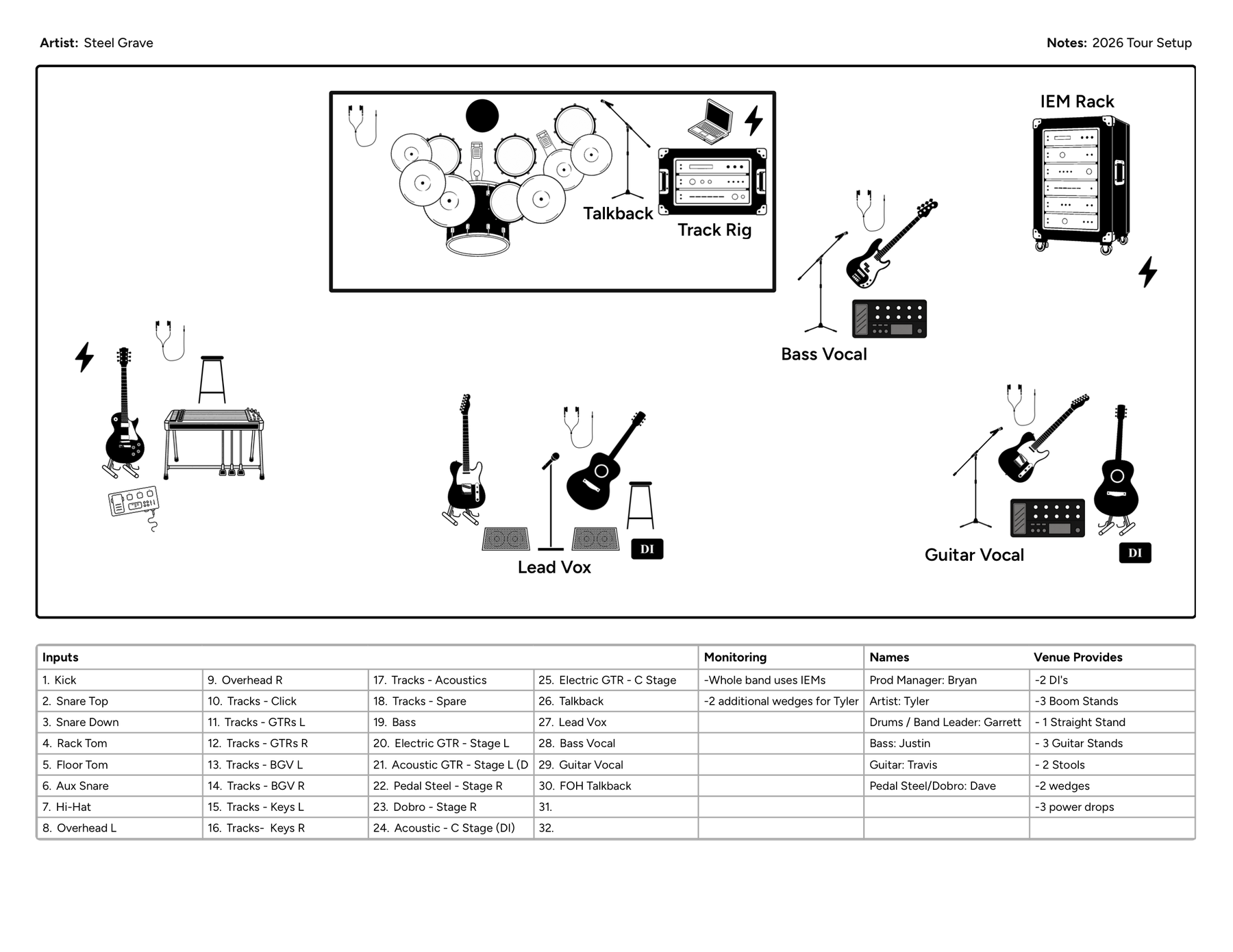
Make monitors and gear responsibilities obvious
Monitor information should be part of the advance, especially if your setup is anything beyond a basic wedge mix. If you use wedges, show where they go and which musicians they belong to. If you use IEMs, make it clear whether the venue is mixing them or whether you travel with your own rack, splitter, or monitor console. You do not need to cram every routing detail onto the plot itself. Keep the visual layout readable and use the notes or input list for anything more technical. Production mainly needs to know what they are responsible for.
One of the easiest ways to create problems at load-in is to leave gear responsibility vague. If your band is bringing its own backline, microphones, stands, IEM rack, DI boxes, playback system, or other technical gear, say so. If you expect the venue to provide something, say that too.
Band provides: drum kit, guitar and bass rigs, vocal mics, playback rig
Venue provides: drum mics, stands, XLR, PA, AC power
The exact split will be different for every show, but the goal is the same. Do not make either side guess.
Shared backline is another place assumptions cause trouble. If the venue or another band is providing drums, guitar cabs, bass cabs, keyboards, or other shared gear, confirm exactly what is available — kick size, number of toms, hardware, cymbal stands, snare, throne, and pedal for drums; the actual cabinet or amp for guitar and bass, not just "backline provided." Your stage plot should still represent how your band normally sets up. The advance is where you confirm how that setup will adapt to the gear on site.
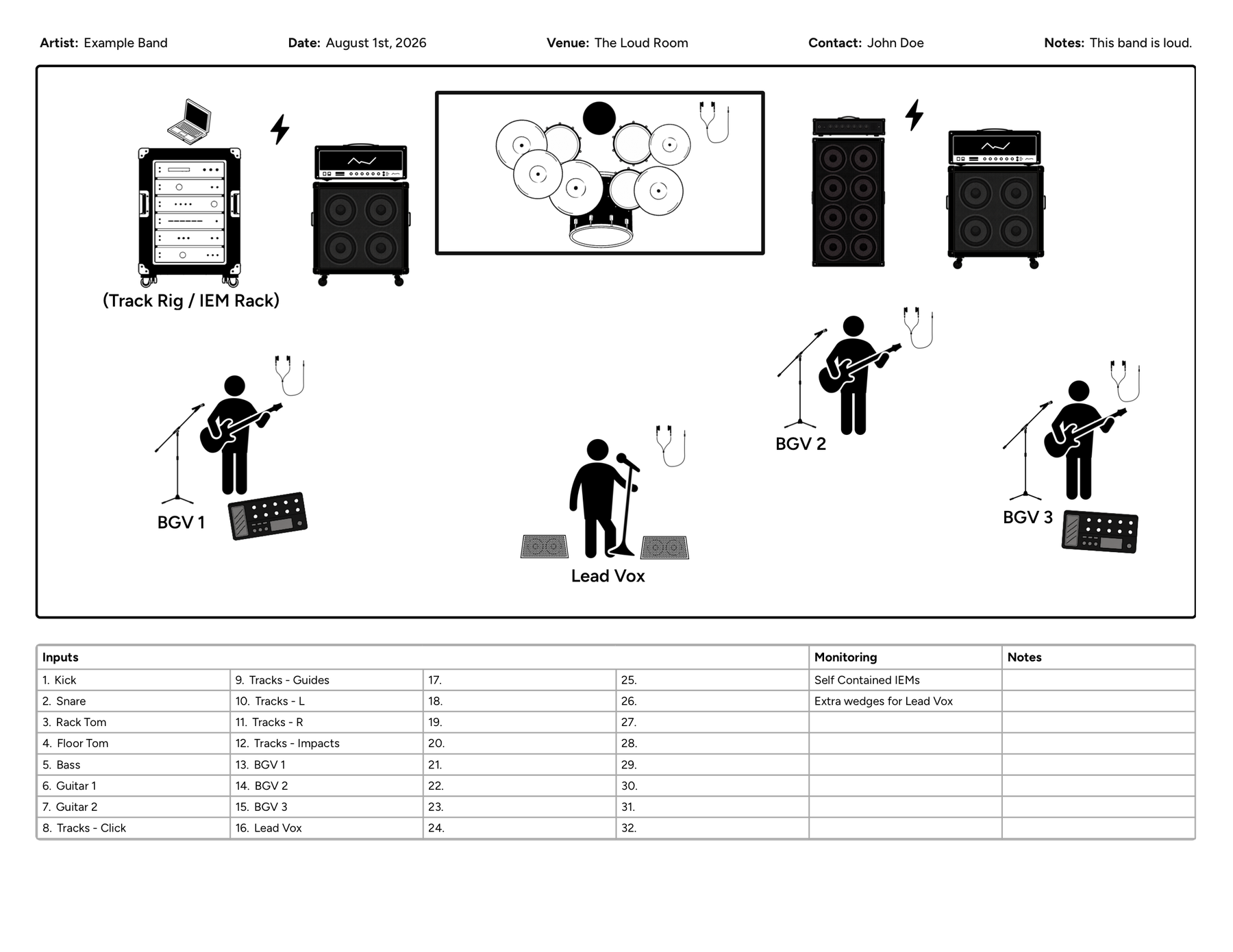
Cover the schedule, unusual needs, and who to contact
The technical advance should also confirm the basic timeline for the day — load-in, soundcheck, doors, set time, curfew, changeover length, and whether line check replaces soundcheck. You do not need to turn the stage plot into a schedule document, but the advance email or tech packet should make the timeline clear. Hard restrictions like a fifteen-minute changeover or no full soundcheck can change how production approaches your setup.
If your show has something that might surprise production, tell them before load-in: self-contained IEM systems, analog splitters, unusually high channel counts, tracks or timecode, electronic drums, multiple playback systems, wireless coordination, large risers, oversized backline, unusual power needs, or video and lighting sync. A stage plot can show where these things sit, but the advance should also explain anything that needs special preparation. If someone needs to make a decision before you arrive, do not hide that information in a tiny note.
Someone on your side should clearly own the advance. For a larger tour, that may be a tour manager, production manager, or FOH engineer. For a smaller band, it may simply be one of the musicians. That is completely fine. Just make sure the venue knows who to contact if something is unclear, and include a name, email, and phone number when appropriate.
Send it early — and keep the plot current
There is not much value in sending a perfect stage plot after the venue has already built the stage. For most shows, send your technical information with enough lead time that production can review it, ask questions, and prepare. A local club date may not need the same lead time as a festival or larger tour stop. The important part is not waiting until the day of the show unless that is unavoidable. If your setup changes after you send the advance, send the updated version.
This matters more than people think. Bands change gear all the time — a guitarist switches rigs, the drummer adds a sample pad, the band moves from wedges to IEMs, tracks get added, a vocal mic disappears. If your stage plot still reflects the setup from six months ago, production may build the wrong thing. Add a date or version number to the document and update it whenever the actual show changes. A current, simple plot is much more useful than a beautiful outdated one.
Keep the advance easy to scan
The person reviewing your advance may be dealing with several shows at once. Do not make them dig through five attachments to understand your setup. Ideally, the core technical information should be easy to find:
- Stage plot
- Input list
- Monitor needs
- Gear responsibilities
- Schedule
- Contact information
- Unusual production notes
If you can keep the stage plot and input list in the same document, even better. The easier the information is to scan, the more likely it is to actually be used.
A strong advance does not need to be complicated. It might be as simple as a short email that confirms the schedule, includes a stage plot and input list, explains what the band is bringing, and calls out anything unusual:
Hi, looking forward to the show. Attached is our current stage plot and input list. We are bringing our own backline, vocal mics, and IEM rack. We will need drum mics, stands, XLR, and AC power from the venue. Please let me know if there are any issues with the setup or schedule.
That covers a lot without burying the important information.
A quick pre-show advance checklist
Before you consider the show advanced, make sure you have confirmed:
- Current stage plot
- Complete input list
- Monitor or IEM setup
- Backline
- What the band provides
- What the venue provides
- Playback or tracks requirements
- Unusual technical needs
- Load-in time
- Soundcheck or line check
- Set time
- Contact information
Then look at the stage plot one more time and ask whether someone who has never seen your band could understand the setup quickly. If the answer is yes, you have done most of the important work.
The stage plot is the center of the advance
There are plenty of details involved in advancing a show, but the stage plot is often the easiest way to bring them together. It gives production a visual reference for the stage, gives context to the input list, helps explain monitor needs, and makes unusual parts of the setup easier to understand. The rest of the advance fills in the gaps.
A good advance does not eliminate every conversation at load-in. It just makes sure those conversations start with everyone on the same page. That means fewer surprises, faster setup, and more time to focus on the show itself. If you want one document that keeps the layout and input list together so updates stay simple, Stage Plot Designer is built for that — build the plot, keep the channels with it, and export a one-page PDF you can send with the advance.